Cybersecurity threats are a constant concern for both individuals and businesses. Every day, cybercriminals are looking for new ways to gain access to accounts, steal information, and compromise systems.
Fortunately, security measures continue to improve. Features such as Multi-Factor Authentication (MFA) have added an important layer of protection, making it much harder for attackers to access accounts using only a stolen password.
However, as security evolves, attackers adapt. One technique that has gained popularity in recent years is called Adversary-in-the-Middle (AiTM) phishing.
Security Improves, So Do Attackers
For years, passwords were the primary way we protected our online accounts. The problem is that passwords can be guessed, stolen, or leaked.
To address this, organizations began implementing MFA. Instead of relying on just a password, users must provide a second form of verification, such as a code from an authenticator app, a text message, or a security key.
This additional step significantly reduced the effectiveness of traditional phishing attacks. But cybercriminals didn't stop there. They developed new methods designed specifically to bypass MFA protections.
One of those methods is AiTM phishing.
What Is AiTM Phishing?
AiTM stands for Adversary-in-the-Middle.
Think of it as a digital version of someone secretly listening to both sides of a phone call and passing messages back and forth. Neither person realizes someone else is in the conversation.
In an AiTM attack, a hacker places themselves between you and the legitimate website you're trying to access. Because everything happens in real time, the attacker may be able to gain access even if MFA is enabled.
How Does It Work?
There are several ways an attacker can deliver an AiTM phishing attack, but they usually begin with a phishing email, text message, or fake notification containing a malicious link.
When a victim clicks the link, they are taken to a website that appears legitimate. It may look exactly like a familiar login page from Microsoft 365, Google, a banking institution, or another trusted service.
Behind the scenes, however, the attacker is acting as a middleman between the victim and the real website.
Here's a simplified breakdown:
- The victim clicks a phishing link.
- The fake website displays what appears to be a normal login page.
- The victim enters their username and password.
- The attacker forwards those credentials to the real website.
- The victim completes MFA.
- The attacker captures the authentication session created after the successful login.
- The attacker uses that authenticated session to access the account.
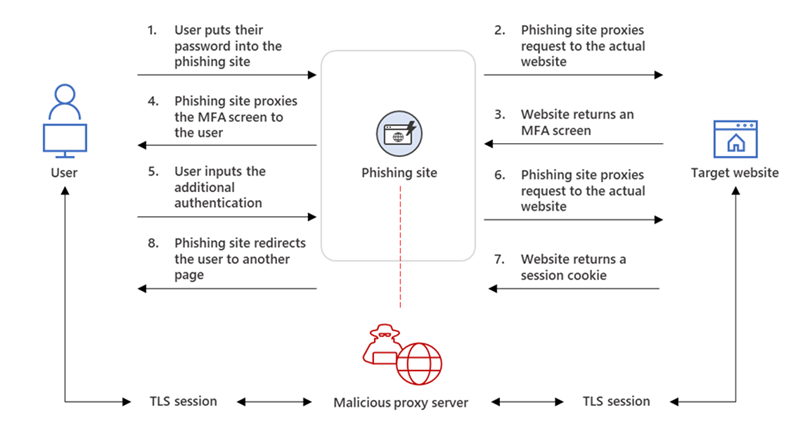
(Microsoft infographic: Figure 2. AiTM phishing website intercepting the authentication process)
What Are Session Cookies?
One of the reasons AiTM attacks can be effective is because they often target session cookies. A session cookie tells a website, "This person has already logged in." Without session cookies, you would have to enter your username, password, and MFA code every time you clicked on a new page.
After you successfully log in, the website gives your browser a temporary pass that proves your identity. This improves convenience for users, but if an attacker steals that pass, they may be able to access the account without needing your password or MFA code again.
That's why AiTM attacks focus not only on credentials but also on capturing authenticated sessions.
How Can You Protect Yourself?
While AiTM phishing is sophisticated, there are several steps that can reduce your risk.
- Be Careful with Login Links
Whenever possible, navigate directly to websites instead of clicking login links in emails or text messages.
- Check the URL Carefully
Attackers often create websites that closely resemble legitimate domains.
- Use Phishing-Resistant Authentication
Modern authentication methods such as security keys and passkeys provide stronger protection against AiTM attacks than traditional one-time passcodes.
- Stay Alert
Unexpected login requests, urgent messages, and requests to verify account information should always be treated with caution.
Why This Matters
AiTM phishing highlights an important reality in cybersecurity: there is no single security feature that completely eliminates risk.
As defenders develop stronger protections, attackers continue searching for ways around them. Understanding how these attacks work helps individuals and organizations make better security decisions and recognize potential threats before they become incidents.
Adversary-in-the-Middle phishing demonstrates how attackers can exploit trust and intercept authentication processes in an attempt to gain unauthorized access.
The best defense combines strong security technology with informed users. Understanding what AiTM phishing is, how it works, and what warning signs to watch for can help keep your accounts and information secure in an increasingly complex threat landscape.
Source: Microsoft